Taxes
Your tax rules per country, the default rule of each country, the reasons printed on invoices and who gets a tax invoice.
This screen holds the tax rules your invoices use, grouped by country, and decides who gets a full tax invoice. Open it from Settings → Taxes. You need permission to change settings.
What you see
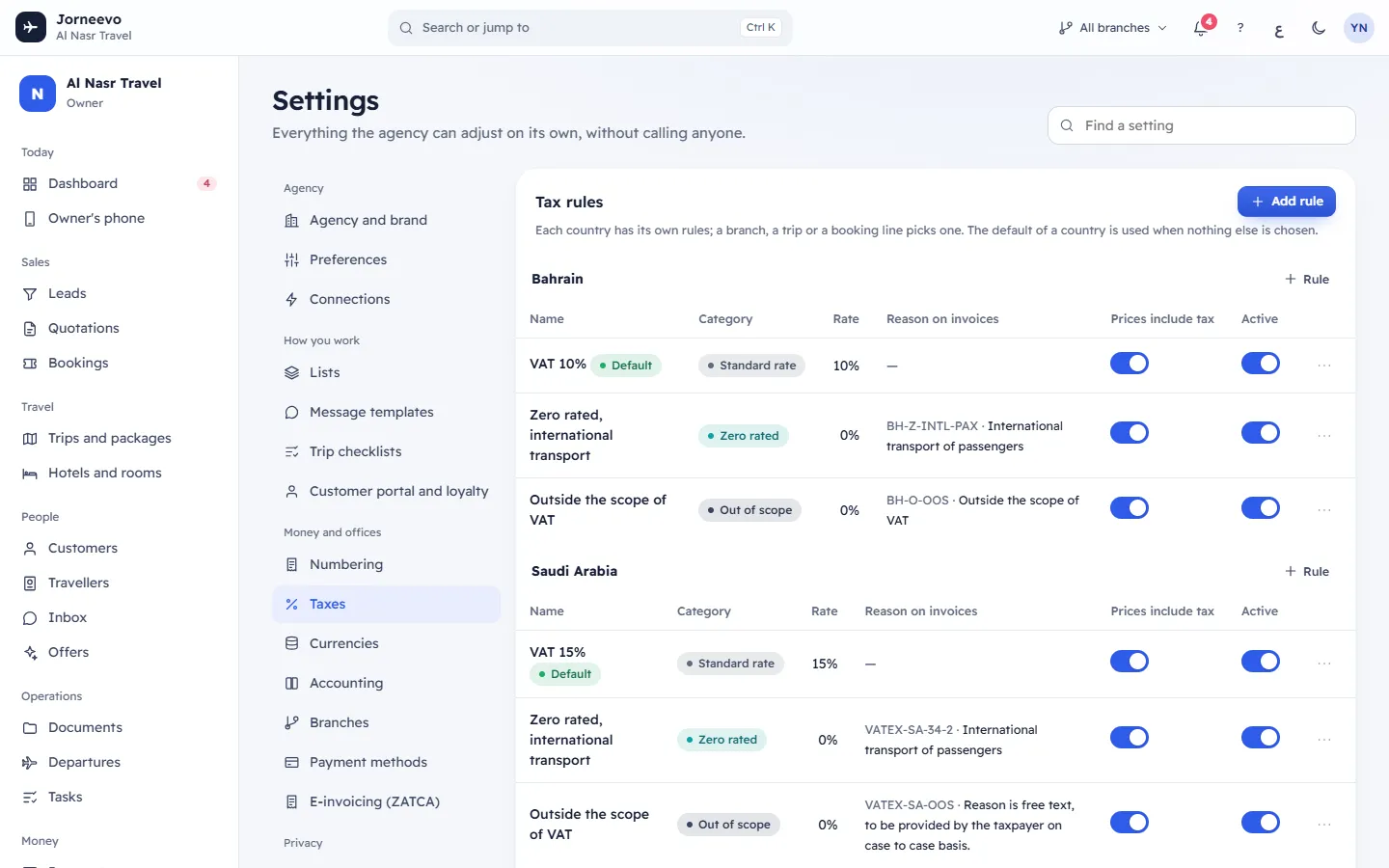
Tax rules
Each country has its own rules; a branch, a trip or a booking line picks one. The default of a country is used when nothing else is chosen. A country's rules are added by themselves when you add a branch there. They start from the country's official rates (for example VAT 15% in Saudi Arabia, 10% in Bahrain, 5% in the UAE and Oman, no VAT in Qatar and Kuwait); see Tax and e-invoicing rules by country.
Each country has a table with Rule (add a rule for that country) and these columns:
| Column | What it shows |
|---|---|
| Name | The rule's name in your language, with Default on the country's default rule |
| Category | Standard rate, Zero rated, Exempt or Out of scope |
| Rate | The tax rate in %. Only standard-rate rules have a rate above 0 |
| Reason on invoices | For non-standard rules: the reason code (in Saudi Arabia ZATCA's VATEX code) and the reason printed on the invoice |
| Prices include tax | Switch. On: the tax is worked out of the price the customer sees, so the total stays as priced. Off: the tax is added on top |
| Active | Switch. A rule that is off is not offered for new lines. The default rule cannot be switched off |
The row menu (Rule actions) has Edit, Default for … (on rules that are not the default) and Delete.
Under the tables, Add a country’s rules… with Add copies the official rules of a country where you sell but have no branch yet. The message Country rules added appears.
Which rule a line gets
A booking line uses its own rule if it has one; if not, its trip's rule; if not, its branch's Tax rule for new lines; if not, the default rule of the branch's country. A line with none of these has no tax (Out of scope, 0%).
Tax invoices for businesses
Who gets a tax invoice (B2B) decides which customers get a full (standard) tax invoice. Everyone else gets a simplified tax invoice. In Saudi Arabia tax invoices are cleared by ZATCA before they reach the customer.
- Companies with a VAT number (the starting choice)
- Every company customer
- Nobody (always simplified)
The choice saves at once. A branch can set its own in Branches (Tax invoice (B2B) for).
Currencies and exchange rates
A short panel with Open currencies. Rates, their history and the report currency are on Currencies and exchange rates.
What you can do here
- Add a rule (Add rule at the top, or Rule under a country): Add a tax rule.
- Edit a rule: the same window as a new rule. Changes apply to new lines; invoices already issued keep their tax.
- Make a rule the country's default with Default for … in its menu. The old default stops being the default.
- Switch Prices include tax or Active on a row. The message Saved appears.
- Delete a rule. The window Delete …? warns: Invoices already issued keep their tax. A rule still used by a branch, trip or line is switched off instead. You see Rule deleted, or Rule switched off (still in use).
If something goes wrong
- Make another tax profile the default first: you tried to delete the default rule while the country has other rules. Make another rule the default, then delete.
- Make another rule the default first: the default rule cannot be switched off. Make another one the default first.
- No tax rules yet: the agency has no branch and no country rules. Add a branch, or use Add a country’s rules….
Related articles
- Add a tax ruleAdd a standard, zero-rated, exempt or out-of-scope tax rule for a country, with the reason printed on invoices.
- BranchesYour offices: each works by its country's currency, VAT and e-invoicing, and prints its own seller details on its invoices.
- Currencies and exchange ratesThe currencies your agency works in, their exchange rates with full history, where rates come from and the currency reports open in.
- Tax and e-invoicing rules by countryThe currency, VAT rate, tax rules, VAT number format and e-invoicing each country starts with, and what happens when a branch is in that country.