Branches
Your offices: each works by its country's currency, VAT and e-invoicing, and prints its own seller details on its invoices.
A branch is one of your offices. Each branch works by its country: currency, VAT and e-invoicing, and the seller details printed on its invoices. Open this screen from Settings → Branches. You need permission to change settings.
What you see
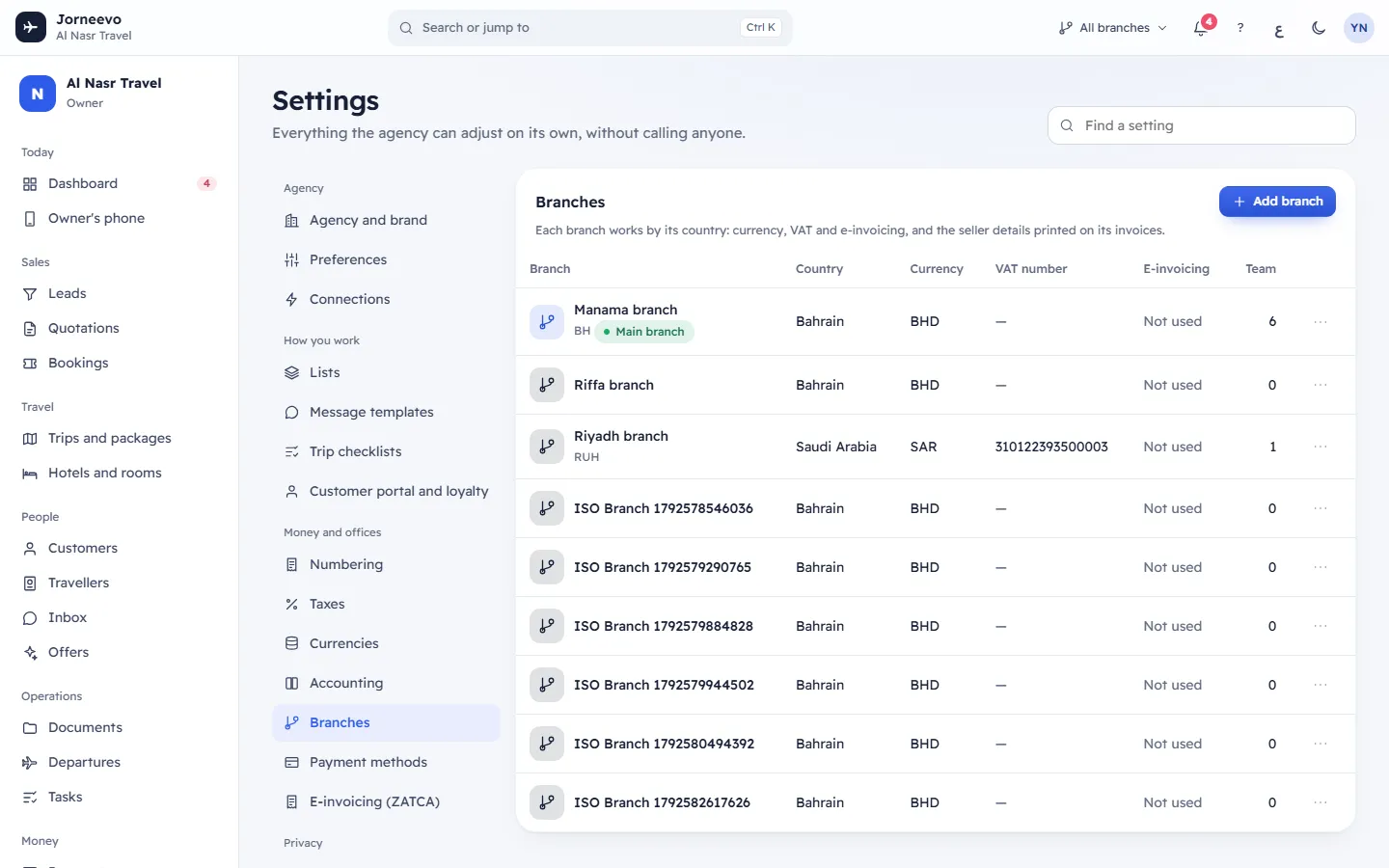
The Branches table, with Add branch at the top. The main branch comes first.
| Column | What it shows |
|---|---|
| Branch | The name, the short code, Main branch on the main one and Off on a branch that is switched off |
| Country | The branch's country |
| Currency | The currency its documents are issued in |
| VAT number | The seller VAT number printed on its invoices |
| E-invoicing | ZATCA when the branch's e-invoicing is on, otherwise Not used (also while a Saudi branch waits for its production device) |
| Team | How many active team members belong to the branch |
The row menu (Branch actions) has Edit. On branches other than the main one it also has Make main branch, Switch off (or Switch on) and Remove.
The branch window
New branch or Edit branch: Pick the country first: it proposes the currency, the tax rules and e-invoicing.
Branch
| Field | What it is | Rules |
|---|---|---|
| Name in English | The branch name | Required, up to 80 characters |
| Name in Arabic | The Arabic name | Optional |
| Country | Sets the currency and tax rules it proposes, and whether ZATCA is offered for E-invoicing | Required. A new branch starts with the agency's country. Locked once the branch has invoices |
| Currency | The currency of the branch's documents | Required. Locked once the branch has invoices. With e-invoicing it must have 2 decimals (for example SAR) |
| Short code | Used in document numbers ({BRANCH}), e.g. RUH | Up to 8 capital letters or digits, different for each branch. Empty: the country code is used in numbers |
| Tax rule for new lines | The tax rule new booking lines of the branch start with | The country’s default, or one of your active rules in that country. If the agency has no rules there yet: Created from the country when saved |
| E-invoicing | Off or ZATCA | ZATCA is offered only in Saudi Arabia. A Saudi branch starts Off (choosing the country never turns it on): Saudi Arabia requires e-invoices through ZATCA (Fatoora). It stays off until the branch has a ready production device (Settings → E-invoicing), then it turns on by itself. Once someone has set the switch, the hint is Saudi Arabia requires e-invoices through ZATCA (Fatoora). Turn it on only when the branch is registered and its device is onboarded. A switch a person turned off stays off. Elsewhere: This country has no e-invoicing scheme here. |
Seller details on invoices
These print on the branch's invoices. When e-invoicing is on, the window says E-invoicing is on: every field marked * is needed before this branch can issue invoices.
| Field | Rules |
|---|---|
| Legal name in English | Defaults to the agency name. Required with e-invoicing |
| Legal name in Arabic | Required with e-invoicing in Saudi Arabia |
| VAT number | Checked against the country's format (Saudi Arabia: 15 digits that start and end with 3; Bahrain: 15 digits; UAE: 15 digits that start with 100; Oman: OM followed by 10 digits). Required with e-invoicing |
| Registration | The type (Commercial registration, MOMRAH licence, MHRSD licence, 700 number, MISA licence, Other id) and the number. A Saudi commercial registration is 10 digits. Required with e-invoicing |
| Street | Required with e-invoicing |
| Building number | Required with e-invoicing. Saudi Arabia: 4 digits |
| Additional number | Saudi Arabia with e-invoicing: required, 4 digits |
| District | Required with e-invoicing |
| City | Required with e-invoicing |
| Postal code | Required with e-invoicing. Saudi Arabia: 5 digits |
| Region | Optional |
| Phone | Optional |
| Optional, must be a valid email |
Spaces in the VAT and registration numbers are removed, and the VAT number is turned into capital letters.
Options
| Field | What it does |
|---|---|
| Tax invoice (B2B) for | Who gets a full tax invoice from this branch: As the agency decides (the choice on Taxes), Companies with a VAT number, Every company customer or Nobody (always simplified). Others get a simplified tax invoice |
| Own document numbers | Bookings, invoices and receipts numbered by this branch. Always on with e-invoicing |
| Active | Switch the branch on or off (not shown on the main branch) |
Save is grey until the English name and the country are filled. After saving, the message Branch saved appears.
What the country decides
- Currency: the country's currency is proposed. Adding a branch in a new currency adds that currency to Currencies with an approximate rate; enter the real rate there.
- Tax rules: the first branch in a country adds that country's official tax rules to Taxes.
- E-invoicing: in Saudi Arabia the branch can issue e-invoices through ZATCA, numbers its own documents and needs the full seller details. It stays off until the branch has a ready production device, then turns on by itself (the branch's audit log records it). Invoices issued while it is off are not e-invoices and are not sent later. Set it up in E-invoicing (ZATCA).
What you can do here
- Add a branch: Add a branch. The first branch becomes the main branch.
- Edit a branch. Its country and currency stay as they are once it has issued invoices: This branch has invoices, so its country and currency stay as they are.
- Make main branch: the message … is now the main branch appears. The branch must be switched on.
- Switch off a branch you no longer use (Branch switched off), and Switch on to use it again (Branch switched on). Its history stays.
- Remove a branch. The window Remove …? says: Only a branch with no team members, trips, bookings or invoices can be removed. Switch it off instead to keep its history. Then Branch removed appears.
Your plan can limit how many branches are switched on (Branches under Usage on Plan and billing). Adding a branch, or switching one back on, over that limit is refused. See Plan limits and how usage is counted.
If something goes wrong
- Another branch uses this code: choose another Short code.
- Use up to 8 capital letters or digits: shorten the short code.
- VAT number: … or Commercial registration: …: the number does not match the country's format shown after the colon.
- … is needed for e-invoicing: fill in the field, or set E-invoicing to Off until the branch is registered.
- Building number: 4 digits, Additional number: 4 digits or Postal code: 5 digits: Saudi address numbers have fixed lengths.
- Additional number is needed for e-invoicing (4 digits) or The Arabic legal name is needed on Saudi invoices: fill in the field.
- E-invoicing needs a currency with 2 decimals (e.g. SAR): choose a 2-decimal currency for an e-invoicing branch.
- Some fields need attention: several fields are wrong; each shows its own message.
- This branch has issued invoices, so its country and currency stay as they are. Add a new branch instead.
- The main branch cannot be switched off. Make another branch the main one first.
- Make another branch the main branch first (when removing the main branch).
- Move the people in this branch to another branch first: move its team members in Team and roles.
- This branch has trips, bookings or invoices. Switch it off instead of removing it.
- Switch this branch on first: a switched-off branch cannot become the main branch.
- Your … plan allows … branches. Upgrade the plan in Settings → Plan and billing to add more.: your plan's Branches limit is reached. Switch off a branch you no longer use, or upgrade: Plan limits and how usage is counted.
Related articles
- Add a branchAdd an office with its country, currency, tax rule and the seller details printed on its invoices.
- TaxesYour tax rules per country, the default rule of each country, the reasons printed on invoices and who gets a tax invoice.
- NumberingThe running numbers your bookings, quotations, invoices, notes, receipts and leads get, for the agency and for each branch.
- E-invoicing (ZATCA)See each Saudi branch's e-invoicing state, onboard and renew its devices with ZATCA, set document options and follow e-invoices that need attention.