The travellers screen
Every person who travels with their passport and documents: find passports that expire too soon and fix them before the trip.
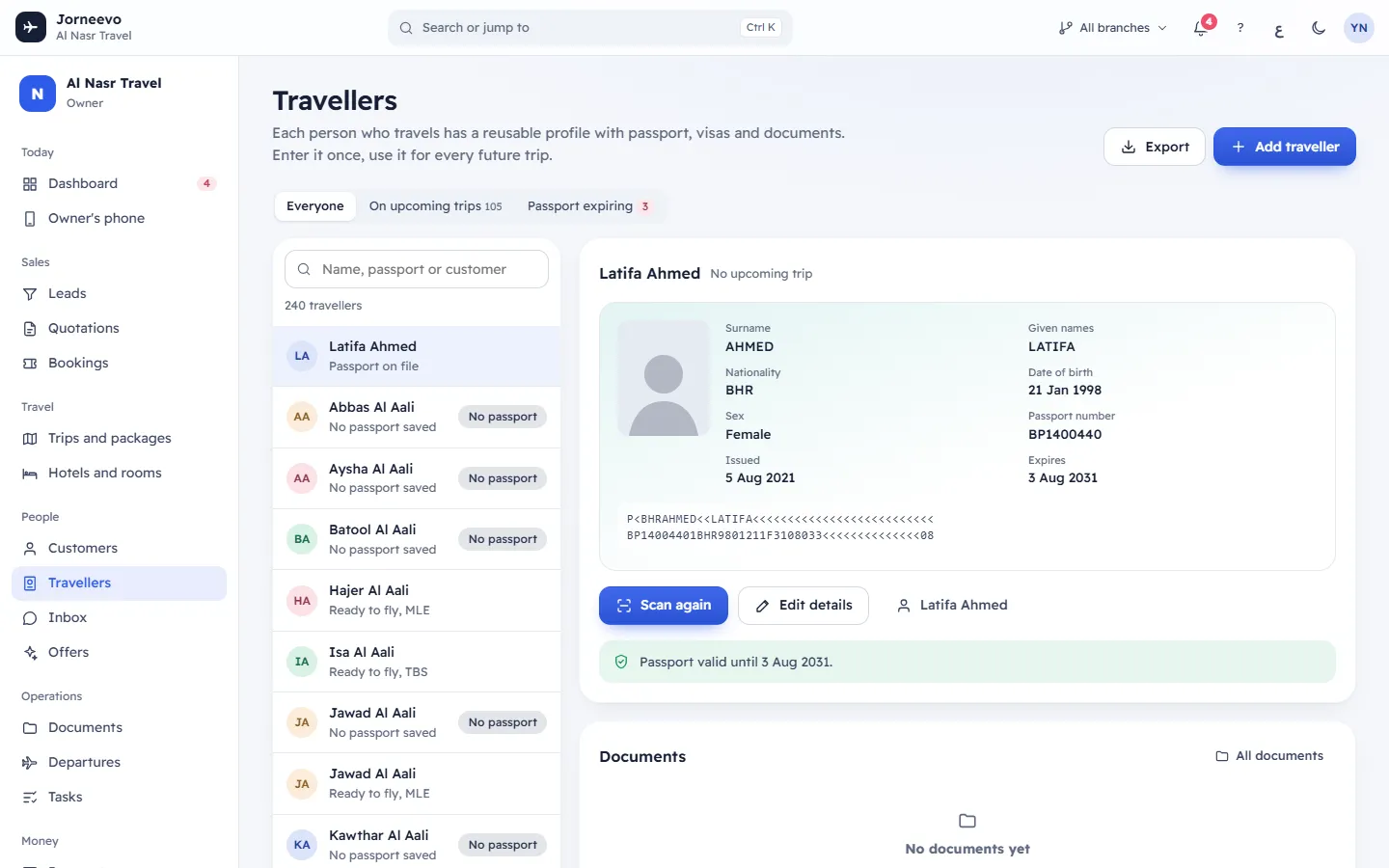
Travellers lists everyone who travels with you, with their passport and the documents uploaded for them. Each person has one reusable profile: enter it once and use it for every future trip. Open it from the menu, under People.
What you see
The header
- Travellers, with the line "Each person who travels has a reusable profile with passport, visas and documents. Enter it once, use it for every future trip."
- Export: downloads the travellers you see (with the current filter and search) as an Excel file, up to 20,000 rows. If your role can see full passport numbers, the file contains them and the message Passport numbers are in full in this file, so keep it safe. appears.
- Add traveller: opens the traveller form. Shortcut:
N. Shown only when your role can add travellers.
The filters
- Everyone: all travellers.
- On upcoming trips, with a count: travellers booked on a confirmed trip that has not come back yet.
- Passport expiring, with a count in a red chip: passports that expire less than six months after the return of the traveller's next trip (or within six months of today, when they have no trip booked).
Search and the list
- Name, passport or customer: type a name (English or Arabic), the last four characters of a passport number, or the
paying customer's name. Press
/to jump to the search box. - A count line under the search: "… travellers", "… travellers on upcoming trips" or "… passports to check".
- Each row shows the name and the passport state, followed by the code of the next trip when there is one:
| State | Meaning |
|---|---|
| Ready to fly | The passport is valid and the traveller has an upcoming trip. |
| Passport on file | The passport is valid; no upcoming trip. |
| No passport saved | No passport expiry date is saved. |
| Passport expires too soon | The passport expires less than six months after the return (or from today). |
| Passport expired | The expiry date has passed. |
Rows that are not valid also show a chip: No passport, Expires soon or Expired. The list shows 40 travellers at a time; press Show more for the next ones.
The passport card
Click a traveller to open their card beside the list (on a wide screen the first one opens by itself). It shows:
- The name and Travelling on with the booking number and the trip, or No upcoming trip. Click the booking number to open it.
- A passport page with Surname, Given names, Nationality, Date of birth, Sex, Passport number, Issued and Expires (in red when expired or too soon), and the two machine-readable lines built from the saved details.
- A note on the passport: no passport saved yet, expired on a date, expires less than 6 months after the traveller returns from the trip, or Passport valid for this trip / Passport valid until a date.
- Scan passport (or Scan again when a passport is saved): see Fill a passport from its two machine lines.
- Edit details: opens Edit traveller, the same form as in Add family travellers to a customer. It also has Remove, which deletes the traveller with their passport details and documents.
- The paying customer's name: opens the customer's file.
- Ask for a renewed passport, when the passport has expired or expires too soon: opens WhatsApp with a ready message, in the customer's language, asking for a photo of the renewed passport.
Documents
Tickets, visas and vouchers uploaded on bookings for this traveller, with the type, the state (Uploaded and sent to the customer, Rejected, needs a new copy or Received), the expiry date and View. All documents opens the Documents screen. With nothing uploaded you see No documents yet.
Empty and error messages
- Pick a traveller: "Their passport and documents show here."
- No travellers found: nobody matches the search.
- No passports expiring: "Every passport is valid six months past the return."
- Could not load travellers.: the list did not load. Refresh the page.
What you can do here
- Add a traveller with Add traveller, and link them to a paying customer with Customer who pays. See Add family travellers to a customer.
- Fill a passport from its two machine lines
- Check passports before a departure with Passport expiring, and press Ask for a renewed passport for each one.
Note
A role without permission to see full passport numbers sees "••••" and the last four digits, here and in the exported file.
Related articles
- Fill a passport from its two machine linesPaste the two lines at the bottom of the passport photo page and the names, passport number, nationality and dates fill in without typing.
- Add family travellers to a customerSave the people who travel with a customer, with their passports, once, so every future booking can use them.
- Customers, travellers and companiesThe customer pays, the travellers fly: how people, families and company customers fit together, and why you enter a passport only once.
- Travellers: frequent questionsShort answers about the six-month passport rule, removing travellers, hidden passport numbers and travellers without a customer.