Account paused
What your team sees when the agency's account is paused, who can still do what, and how to open it again.
When the account is paused, every screen of the app is closed and everyone in the team sees only the Account paused screen. It usually means a subscription invoice is still unpaid after its grace days, or the subscription ended after it was cancelled. Your data is kept.
What you see
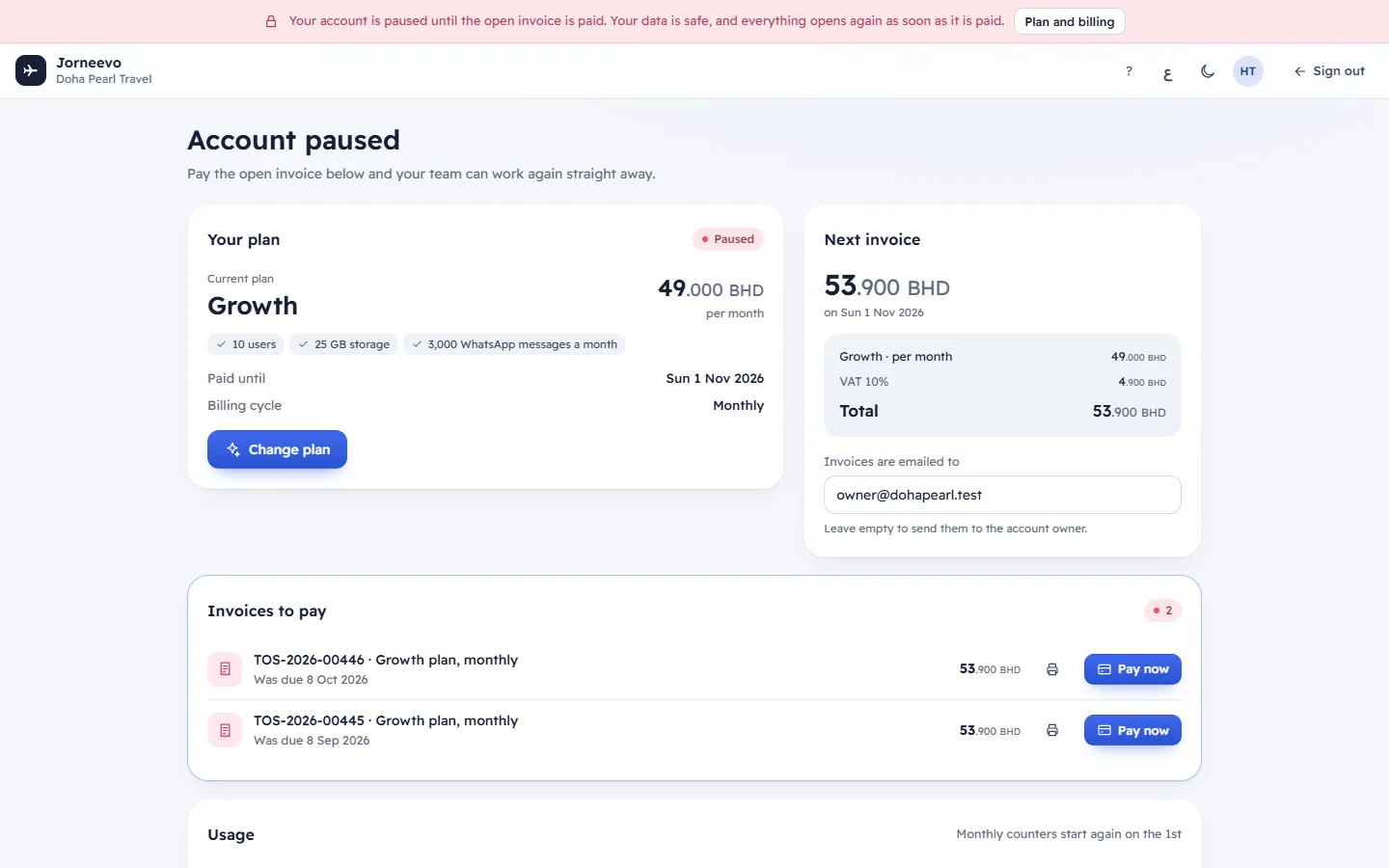
A red bar at the top. Its text depends on why the account is paused:
- unpaid invoice: Your account is paused until the open invoice is paid. Your data is safe, and everything opens again as soon as it is paid.
- subscription ended: Your account is paused because your subscription has ended. Your data is safe. Reactivate the plan to carry on.
- paused by the platform: Your account has been paused by the Jorneevo team. Your data is safe. Contact Jorneevo support to open it again. The platform's support email and phone show under it.
- no recorded reason: Your account is paused. Your data is safe. See Plan and billing for what is needed to open it again.
The bar also has a Plan and billing button, which scrolls down to it (not when the platform paused the account).
The top bar with the agency's name, help (?), the language and light or dark switches, your account menu and Sign out. The side menu and search are not there.
The heading Account paused with one line that follows the reason and your role, for example:
- unpaid invoice, for the owner: Pay the open invoice below and your team can work again straight away.
- subscription ended, for the owner: Reactivate your plan below. A new period starts today with an invoice, and your team can work again straight away.
- subscription ended, for everyone else: Ask the agency owner to reactivate the plan. Your work is safe.
- paused by the platform: Only the Jorneevo team can open the account again. Your work is safe.
For people who can see billing: the Plan and billing screen below it, with the overdue invoice under Invoices to pay and the chip Paused (or Cancelled when the subscription ended). See The Plan and billing screen.
For everyone else: a box Who can open the account again, listing the owner and the people who can manage billing, with their name and email (the owner is marked (owner)).
Any other address in the app shows this same screen.
Who can do what
| Who | What they can do while the account is paused |
|---|---|
| The owner (and any role with Manage the plan and pay invoices) | Pay the invoice, press Reactivate, change the plan, change the billing email, print invoices. |
| People who can change settings (the Manager role by default) | See Plan and billing, but not pay or change anything. |
| Everyone else | See the Account paused screen and the box Who can open the account again. |
| Anyone with the invoice email | Pay the invoice from the link in the email, without signing in. |
Your customers cannot sign in to their customer account while the account is paused. Trip pages and payment links you already sent them still open.
What you can do here
- Pay the overdue invoice: press Pay now under Invoices to pay, or open the link in the email. See Pay your subscription invoice. Once the payment is confirmed the account is Active again at once; sign in again or reload the page.
- Subscription ended: press Reactivate in Your plan and confirm Reactivate your plan?. A new period of the current plan starts today with an invoice for the plan price (plus tax), and the account opens at once. Pay that invoice by its due date. On the free plan the account opens with no invoice.
- Choose a bigger or smaller plan before paying: Change your plan and pay the invoice.
- Sign out: press Sign out.
Why an account is paused
| Reason | How you can tell | How it opens again |
|---|---|---|
| An invoice is unpaid after the grace days | An Overdue invoice under Invoices to pay; the billing email received … has been suspended. | Pay the invoice. It opens at once. |
| The subscription ended after Cancel at period end | The chip says Cancelled; Next invoice says No more invoices. | Press Reactivate. It opens at once. |
| The platform paused the account | The red bar names the Jorneevo team. | Contact Jorneevo support. Paying an invoice or Reactivate does not open it. |
Note
Nothing is deleted while the account is paused. Bookings, customers, payments, documents and settings are all there when it opens again.
If something goes wrong
- This agency is suspended. Please contact support.: shown when the app tries to open data while the account is paused. Pay the open invoice, or contact support if there is none.
- You paid but still see Account paused: reload the page. If the invoice page said The bank is still confirming…, wait until it shows Payment received. Thank you!.
Related articles
- How your plan and billing workTrial, monthly or yearly renewals, due dates and grace days, what happens when a payment is late, and the bar each state shows.
- Pay your subscription invoiceOpen the link in the invoice email, check the invoice and pay it by card. No sign-in is needed, and a paused account opens again at once.
- The Plan and billing screenYour agency's plan and its limits, the next invoice, invoices to pay, usage this month and every invoice from the platform, on one screen.
- Plan and billing: common questionsWho can pay, receipts and tax invoices, the billing email, downgrading with too many users, your data when paused and the end of the trial.