The subscription invoice page
The secure page behind the invoice email link: the invoice details, printing, the card payment and every message it can show.
This page shows one invoice from the platform for your plan, and takes its payment. It opens from the link in the invoice email, or from Pay now on Plan and billing. Anyone with the link can open it; no sign-in is needed.
What you see
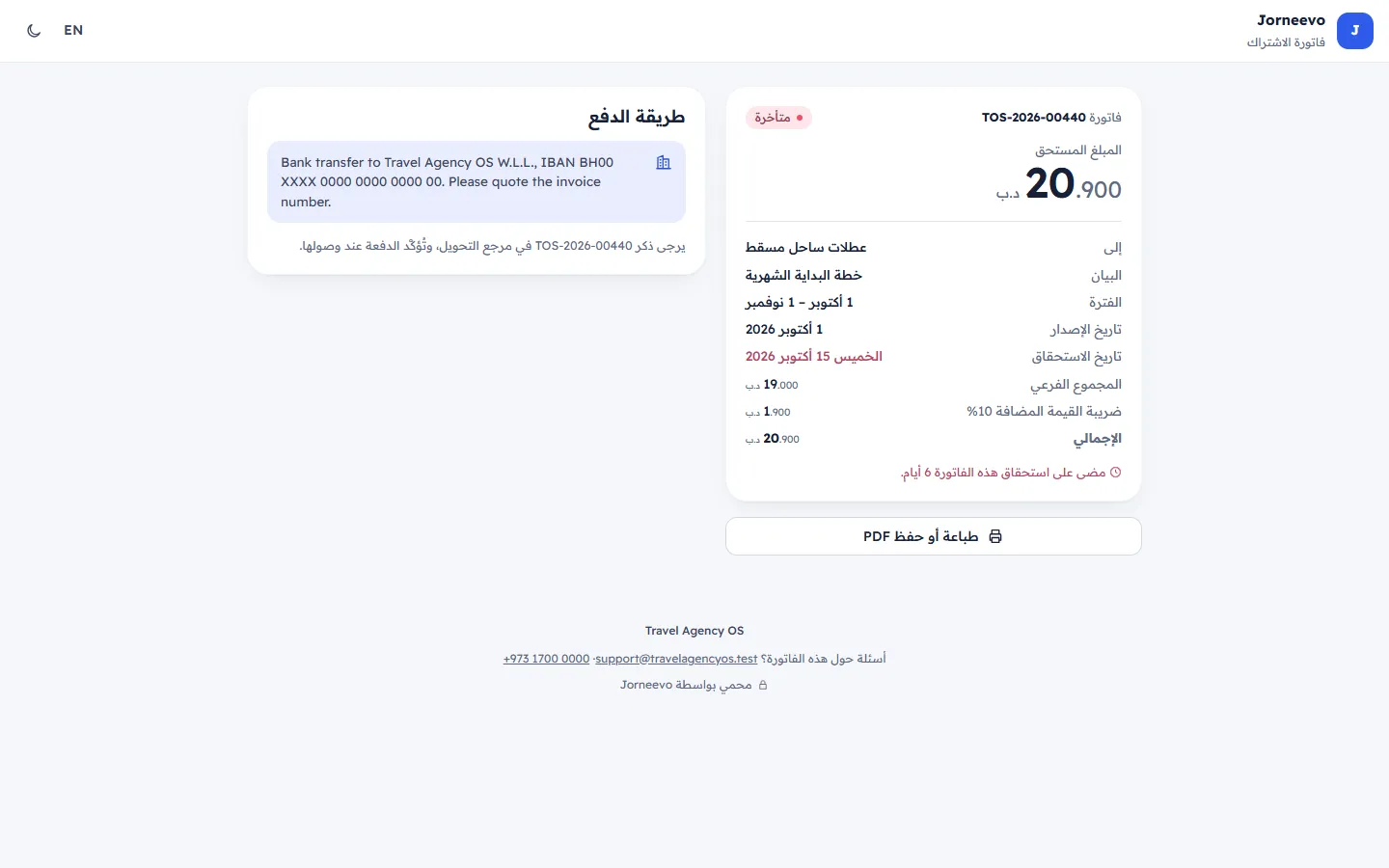
The top bar
The product's name with Subscription invoice, then ع / EN to switch the language and the moon or sun to switch between light and dark. The first time, the page opens in the account owner's language.
The paused note
When the agency's account is paused and this invoice can be paid: The account of … is paused for now. Everything is kept safe, and access returns as soon as this invoice is paid.
The invoice
- Invoice and its number, with a status chip: Due, Overdue, Paid or Cancelled.
- Amount due (or Amount paid once it is paid) in large figures.
- Billed to: your agency's name. Description: the plan and cycle, or what the invoice is for. It shows in the page's language, except on invoices the platform typed by hand.
- Period: the dates the invoice covers (not shown for a one-day invoice).
- Issued and Due date (in red when it is overdue).
- Subtotal, the tax with its rate (for example VAT 10%) and Total.
- A line about the date, while the invoice can be paid: This invoice was due … days ago. (or yesterday), This invoice is due today. or Please pay by ….
- A note from the platform, when there is one.
- Print or save as PDF: opens the printable invoice in a new tab, in the language of the page. It shows the platform's company name, address and VAT number, your agency's details, the dates, the amounts, the payment reference once paid, and a Pay now button while it is unpaid.
The payment box
What it shows depends on the state of the invoice and on how the platform takes payments.
- Pay securely (card through a payment gateway): You will continue to … to pay, then come back here by yourself., the Pay … button with the amount, the accepted card brands, Secure payment by … and Your card details never reach us; the bank handles them.
- How to pay (bank transfer): the platform's payment instructions and Please mention … in the transfer reference. The payment is confirmed when it arrives.
- In test mode only, the box says so: Test mode: this gateway is in sandbox, so no real money moves. Use the gateway's test cards., or shows the Pay by card form with Test gateway, no real money.
After the gateway, the box shows the state of the payment:
| Message | What it means and what to do |
|---|---|
| Confirming your payment with the bank… | Wait a few seconds and keep the page open. |
| The bank is still confirming… | The page checks again by itself. Press Check again after a minute if needed. Do not pay twice. |
| The payment did not go through | No money was taken. Press Try again. |
| You cancelled the payment | Nothing was charged. Press Try again when ready. |
| Payment received. Thank you! | Paid. A PAID stamp shows, with Invoice, Amount, Paid on, Reference and Open my account. |
| This invoice is paid | Shown when you open the link of an invoice that was paid before. |
| This invoice was cancelled | There is nothing to pay. If you think this is a mistake, contact support. |
Under a paid invoice: A receipt is on its way by email. You can print this invoice any time., or, while the account is still paused, Your account opens again in a moment. Sign in as usual.
The footer
The platform's company name, address and VAT number, Questions about this invoice? with the support email and phone, and Secured by ….
What you can do here
- Pay the invoice by card: Pay your subscription invoice.
- Print it or save it as PDF: Print or save as PDF.
- Go to the app after paying: Open my account (sign in as usual).
Statuses
| Status | What it means |
|---|---|
| Due | Waiting for payment; the due date has not passed. |
| Overdue | The due date passed. The account shows Payment overdue, and it is paused if it stays unpaid after the grace days. |
| Paid | Paid. The page shows the payment summary. |
| Cancelled | Cancelled by the platform; nothing to pay. |
Messages you may see
- Invoice not found: Check the link in the invoice email, or contact support.
- This invoice is already paid or This invoice is no longer payable: shown when you press Pay … on an invoice that was paid or cancelled in the meantime. Reload the page.
- Too many tries in a short time. Wait a little, then try again.: more than 20 payment attempts in 10 minutes.
Related articles
- Pay your subscription invoiceOpen the link in the invoice email, check the invoice and pay it by card. No sign-in is needed, and a paused account opens again at once.
- The Plan and billing screenYour agency's plan and its limits, the next invoice, invoices to pay, usage this month and every invoice from the platform, on one screen.
- Account pausedWhat your team sees when the agency's account is paused, who can still do what, and how to open it again.
- Plan and billing: common questionsWho can pay, receipts and tax invoices, the billing email, downgrading with too many users, your data when paused and the end of the trial.