Numbering
The running numbers your bookings, quotations, invoices, notes, receipts and leads get, for the agency and for each branch.
This screen sets the number each new document gets: bookings, quotations, tax invoices, credit notes, debit notes, payment receipts and leads. Open it from Settings → Numbering. You need permission to change settings.
The note at the top sums up the rule: each kind of document has its own running number, and you can change the prefix or pattern at any time. Numbers already given never change.
What you see
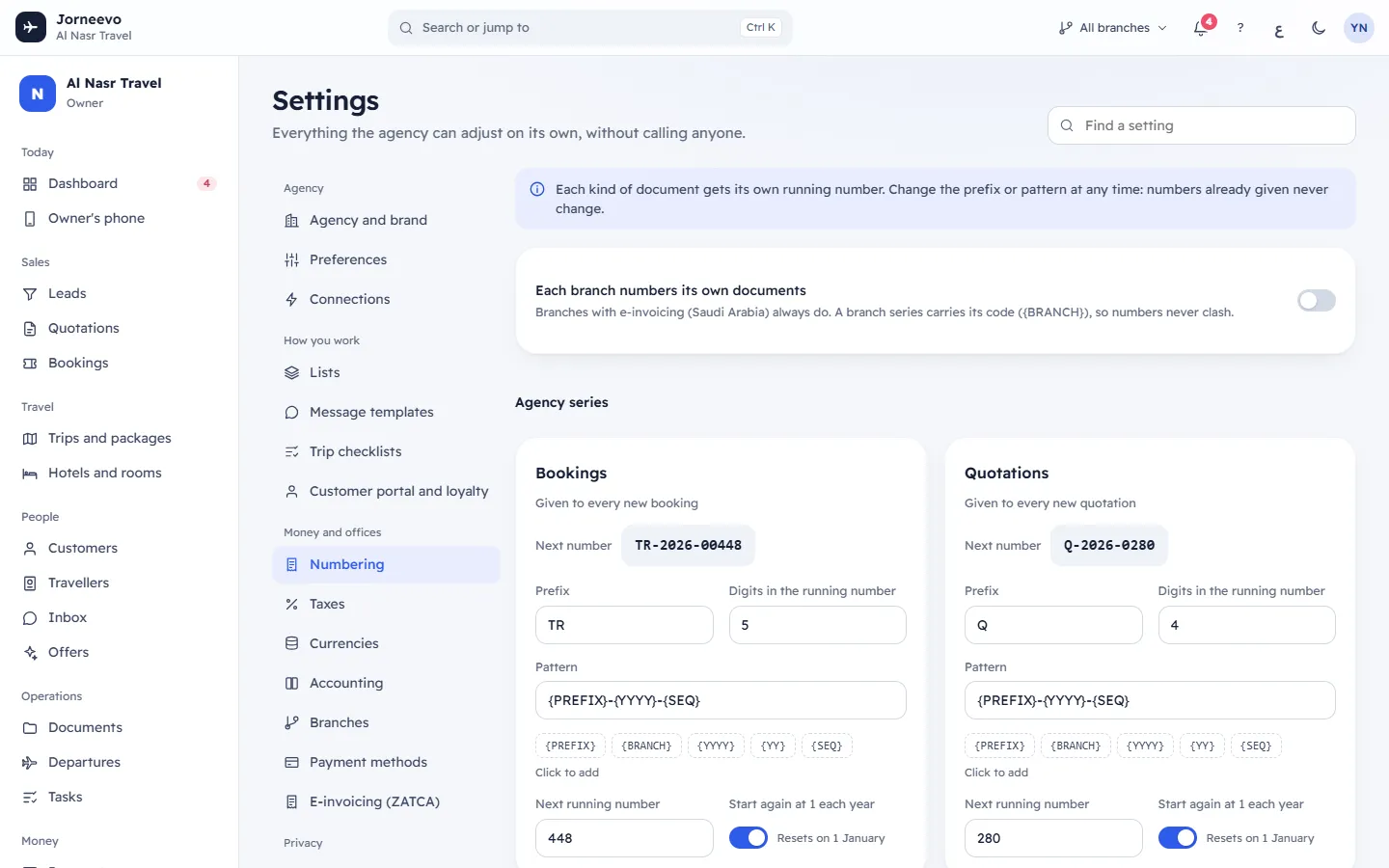
Each branch numbers its own documents
This switch appears only when the agency has two or more branches. When it is on, every branch gets its own series
for each document, with the branch code in the number (the {BRANCH} token), so two branches never give the same
number. Branches with e-invoicing (Saudi Arabia) always number on their own, whatever this switch says. A single
branch can also number on its own with Own document numbers in Branches.
Agency series
One card per kind of document, in this order. With two or more branches, the cards sit under the heading Agency series.
| Card | What it numbers |
|---|---|
| Bookings | Given to every new booking |
| Quotations | Given to every new quotation |
| Tax invoices | Tax rules require numbers in order without gaps |
| Credit notes | Issued when an invoice is reduced or cancelled |
| Debit notes | Issued when an extra charge is added to an invoice |
| Payment receipts | Given to every payment you record |
| Leads | Given to every new enquiry |
A numbering card
- Next number: the number the next document will get, built from the fields below as you type.
- Forward only (lock tag): on Tax invoices, Credit notes and Debit notes. Their next number can only go up, and the card says Invoice numbers never go back, so no number is ever used twice.
- Prefix: up to 10 characters, turned into capital letters. It replaces
{PREFIX}in the pattern. It cannot be empty. - Digits in the running number: from 1 to 10. The running number is filled with zeros on the left to this length
(5 digits:
00042). - Pattern: how the number is laid out. It must contain
{SEQ}. Under it, the token buttons{PREFIX},{BRANCH},{YYYY},{YY}and{SEQ}(Click to add) add a token at the end, with a dash before it. - Next running number: the running number the next document gets. On forward-only cards the hint says Can only move forward.
- Start again at 1 each year: on, the running number goes back to 1 with the first document of a new year (Resets on 1 January). Off, it keeps counting (Keeps counting).
When you change a card, Undo and Save appear on it. See Numbering tokens, formats and rules for every token and examples.
Branch series
Below the agency cards, each branch that numbers on its own has its own block: the branch name and its short code, then its own cards (leads are always numbered by the agency, never per branch).
- If the branch has no series yet, the block says The series is made from the agency’s on the first document. Press Set up now to make it at once and adjust it before the first document.
- Not in use: the branch has a series from before, but it does not number on its own now. Its documents use the agency series.
What you can do here
- Change a prefix, the digits, the pattern, the next number or the yearly restart: Change how documents are numbered.
- Turn Each branch numbers its own documents on or off. The change applies to the next documents only.
- Press Set up now on a branch to create its series from the agency's. The message Branch numbering ready appears.
Note
Changing numbering never renumbers documents already issued. A booking that is TR-2026-00042 keeps that number
even if you change the prefix to BK today.
If something goes wrong
- The pattern must contain {SEQ}: add
{SEQ}to the pattern. - Add {YYYY} or {YY}, or stop starting again each year: a number that restarts every year needs the year in it, or numbers would repeat. Add a year token or turn the yearly restart off.
- Cannot go below …: on a forward-only card the next number is lower than the current one. Type a higher number.
- A branch series needs {BRANCH} in the pattern: put
{BRANCH}back in a branch card's pattern. - … is already used. Pick a higher next number or change the prefix.: a document already has the number the next one would get. Raise Next running number or change the prefix.
Related articles
- Change how documents are numberedChange the prefix, digits, pattern, next number or yearly restart of a document series, for the agency or for one branch.
- Numbering tokens, formats and rulesEvery numbered document, every pattern token, digits, yearly restart and branch codes, with examples and what happens to old numbers.
- BranchesYour offices: each works by its country's currency, VAT and e-invoicing, and prints its own seller details on its invoices.
- E-invoicing (ZATCA)See each Saudi branch's e-invoicing state, onboard and renew its devices with ZATCA, set document options and follow e-invoices that need attention.