A customer's file
Everything about one customer on one page: contact details, spend, trips, customer app, points, family travellers, quotations and messages.
The customer's file opens beside the customers list when you click a name. It shows who the customer is, what they have booked and paid, who travels with them and every message you sent them.
What you see
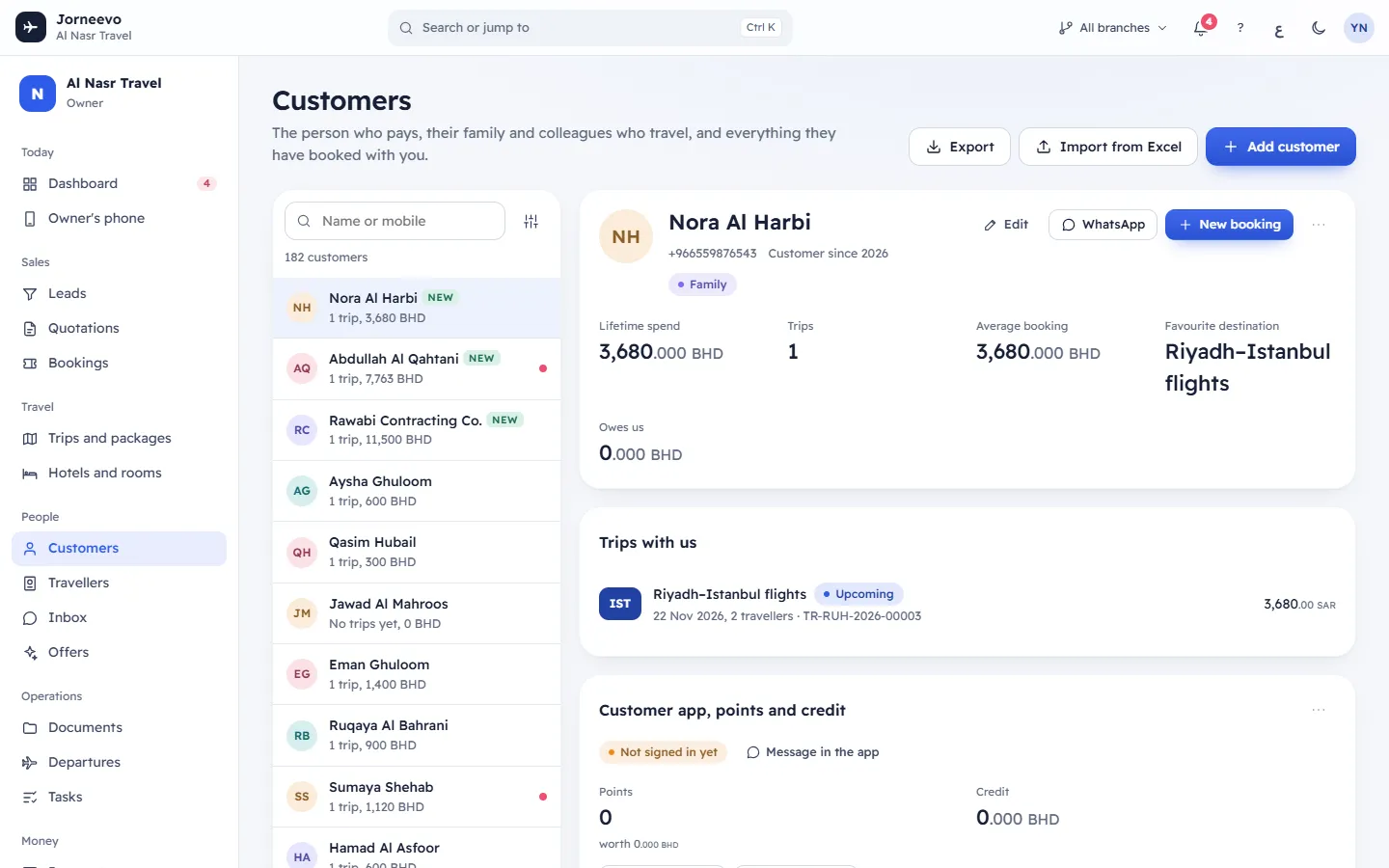
The header
- The name (the Arabic name on the Arabic screen), the mobile, the email and Customer since with the year they were added.
- Chips for the segment, the source and Company when the customer is a company.
- For a company: the VAT number, the CR (commercial registration), any other id, and the district and city.
- The customer's tags, such as VIP.
- Edit: opens Edit customer, the same form as Add a customer.
- WhatsApp: opens WhatsApp on your device with "Hello" and the customer's name (in Arabic for an Arabic customer). It is greyed out when there is no mobile.
- New booking: starts a booking with this customer already chosen. See Create a booking.
- The ⋯ menu:
- New quotation: starts a quotation for this customer.
- Merge a duplicate into this customer: see Merge duplicate customers.
- Delete customer: removes the customer. It is greyed out with Not possible: has bookings or quotations when the customer has any. Their saved travellers stay, without a customer. You are asked to confirm, and it cannot be undone.
Edit, merging, deleting and saving notes need permission to add and edit customers; New booking and New quotation need permission to create bookings and quotations.
The numbers
| Number | What it shows |
|---|---|
| Lifetime spend | The total of all their bookings. |
| Trips | How many bookings they have. |
| Average booking | Lifetime spend divided by trips. |
| Favourite destination | The destination they booked most. |
| Owes us | What is still unpaid on their bookings. Red when above zero. |
Cancelled bookings are not counted in any of these numbers.
Trips with us
Every booking, newest first: the trip code and name, the departure date, the number of travellers, the booking number and the total. Chips show Cancelled, Upcoming (the trip has not come back yet), Overdue (a payment is late) or Balance due. Click a booking to open it. With no bookings you see No trips yet and a New booking button.
Customer app, points and credit
- The customer app status: Not signed in yet, In the app with the last time they used it, Blocked from the app, or Customer app is off for the agency. When they are signed in, you also see how many devices.
- Message in the app starts a chat with the customer, or Open the chat opens the one you already have (with the number of unread messages). It opens in Inbox. You need permission to chat with customers.
- Points: the points balance and, when loyalty points are on, what they are worth in your main currency.
- Credit: the credit balance in each currency.
- Adjust points and Adjust credit: see Adjust a customer's points or credit.
- History, with the tabs Points and Credit: the last 30 movements, with the kind, the booking, the date, who made it, the note and the expiry date.
- The ⋯ menu: invite the customer, copy the app address, sign out every device, block or allow. See Invite a customer to the customer app.
Loyalty points and customer credit explains how points and credit work.
Travels with
The family members or colleagues saved for this customer: name, relation, and the passport state (Passport on file, No passport saved, Passport expired or Passport expires soon) with the expiry date. Click a name to see or edit the traveller; press Add (or Add family when the list is empty) to add one. See Add family travellers to a customer.
Preferences
Language of messages, Contact by (WhatsApp, Phone call or Email), Rooms (the room preference), Offers (Agreed to WhatsApp offers or No consent to offers yet) and Owner, the team member who added the customer.
The tabs
- Quotations: their quotations, with the number, the number of options, valid until, the state and the lowest price from. Shown only when your role can see quotations.
- Leads: enquiries that were converted to this customer. Shown only when your role can see leads.
- Messages: the last 50 messages sent to the customer or about their bookings and quotations, with the channel, the text, the time, the recipient and the status: Sent, Logged only, Ready in WhatsApp or Failed.
- Notes: free notes for the team. Type and press Save notes; the message Notes saved appears.
Messages you may see
- No quotations yet, No leads linked, No messages yet, Nobody saved yet., Nothing yet: there is nothing to show in that part yet.
- This customer could not be found: the customer was deleted or merged into another one. Press All customers.
What you can do here
- Add family travellers to a customer
- Adjust a customer's points or credit
- Invite a customer to the customer app
- Merge duplicate customers
- Book a trip for the customer: Create a booking
Note
A role without permission to see full passport numbers sees only the last four digits of the family's passports.
Related articles
- The customers listFind any customer by name or mobile, filter by segment or source, see who owes you money, and export or import your list.
- Add family travellers to a customerSave the people who travel with a customer, with their passports, once, so every future booking can use them.
- Adjust a customer's points or creditAdd or take away a customer's loyalty points or credit by hand, with a reason and an optional expiry date.
- Invite a customer to the customer appSend a customer the link to their own account, where they see their trips, payments, points and offers, and manage their access.
- Merge duplicate customersJoin two records of the same customer into one, keeping their bookings, travellers, quotations, points, credit and chats.