Contract hotel rooms for a trip
Reserve a block of hotel rooms for a trip or package (an allotment), with the room types, nights, meals, rates and release date.
Contract rooms when you agree a block of rooms with a hotel for a trip. The rooms then belong to that trip for those nights, and bookings on the trip get rooms from them.
Before you start
- You need permission to manage hotels.
- The hotel exists and is not archived. See Add a hotel and its rooms.
- The trip or package exists, is not cancelled and has not come back yet.
Steps
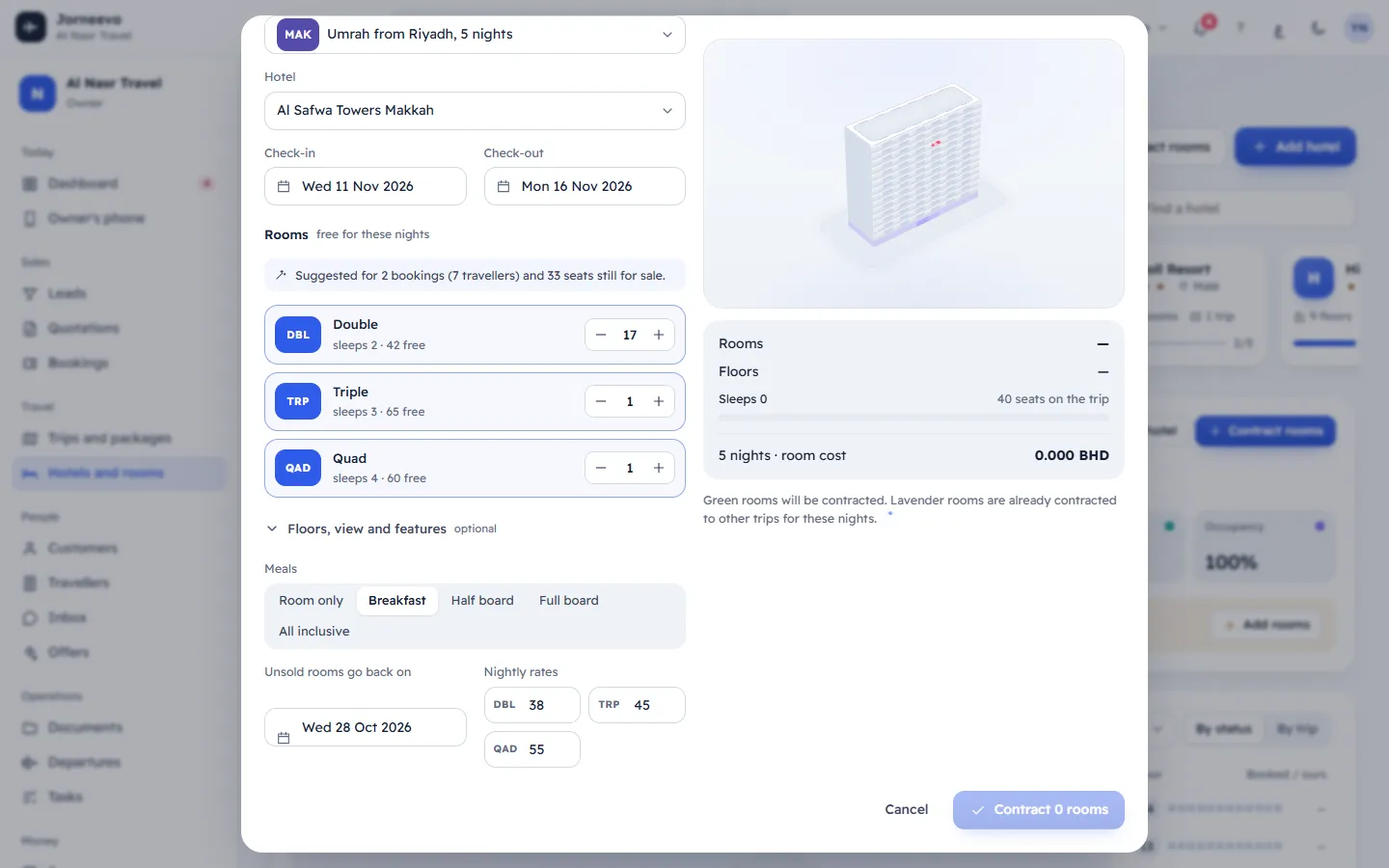
- On the hotel, press Contract rooms. You can also press Contract hotel rooms in the trip's Hotels and rooms tab: the trip is then chosen for you.
- Choose the Trip or package and the Hotel. Hotels in the trip's city come first, then the same country, then other city.
- Check Check-in and Check-out. They start with the trip's dates; check-out must be after check-in.
- Under Rooms, set how many rooms of each type with the counters. Each line shows "sleeps 3", how many are free for these nights and how many are in use. Press Use the suggestion to size the rooms for the parties already booked and the seats still for sale.
- Optional, under Floors, view and features: Prefer these floors, a View (Any or one side) and Rooms should have (features you prefer). Without floors, rooms go to the floors with the most free rooms, kept together.
- Choose the Meals plan, the date Unsold rooms go back on (the release date) and the Nightly rates per room type (empty uses the hotel's usual rates).
- Check the mini building on the right: Green rooms will be contracted. Lavender rooms are already contracted to other trips for these nights. The summary shows the rooms, floors, how many people they sleep against the trip's seats, the nights and the room cost.
- Press Contract 12 rooms (the button shows your number).
After you contract
- The message "12 rooms contracted at …" appears.
- The contract shows in the hotel's Contracts and nights, and in the trip's Hotels and rooms tab.
- Confirmed bookings already on the trip get rooms straight away, families kept together. See How rooms are given out automatically.
- The trip's Ready to depart card ticks Hotel rooms contracted.
Note
Two contracts can never share a room on the same night. If someone else contracts the same rooms while you are choosing, you see a message and pick again.
If something goes wrong
- Pick a trip: choose the trip or package first.
- "Not enough free rooms: … Remove a filter or pick another type.": fewer rooms of that type are free than you asked for.
- Check-out must be after check-in: fix the dates.
- No free rooms match. Try other floors or fewer rooms.: remove the floor, view or feature preference, or ask for fewer rooms.
- Some of those rooms are already taken on these nights or Some of those rooms were just contracted to another trip. Check the rooms again.: the rooms were taken meanwhile. Open the window again and choose.
Related articles
- Change or release a room contractAdd or give back rooms, change the meals, rates or release date of a contract, or release the whole contract back to the hotel.
- Room contracts (allotments) and release datesWhat a room contract is, what the release date means, and how the rooms nobody booked leave the contract on that date by themselves.
- How rooms are given out automaticallyWhen the system gives hotel rooms to bookings, how it splits a party into rooms and keeps families together, and which rooms it skips.
- Export and send the rooming listCheck who sleeps in each room, download the rooming list as Excel or print it, send it to the hotel and mark it as sent.