Preferences
Your agency's working rules for seats, deposits, rooms, seat holds, quotation validity, the customer trip page, receipts and vouchers.
Preferences holds the rules your team works by: how seats are counted, what deposit to suggest, when the balance is due, how long quotations last, how the customer trip page is protected and what is printed on vouchers. Open it from Settings → Preferences.
Every rule is explained on screen in plain words. Each one is saved at once when you change it, and Setting saved appears. Numbers you set with − and + are saved when you stop clicking. If a change cannot be saved, the old value comes back and the error shows. Only the voucher texts at the bottom use a save bar.
What you see
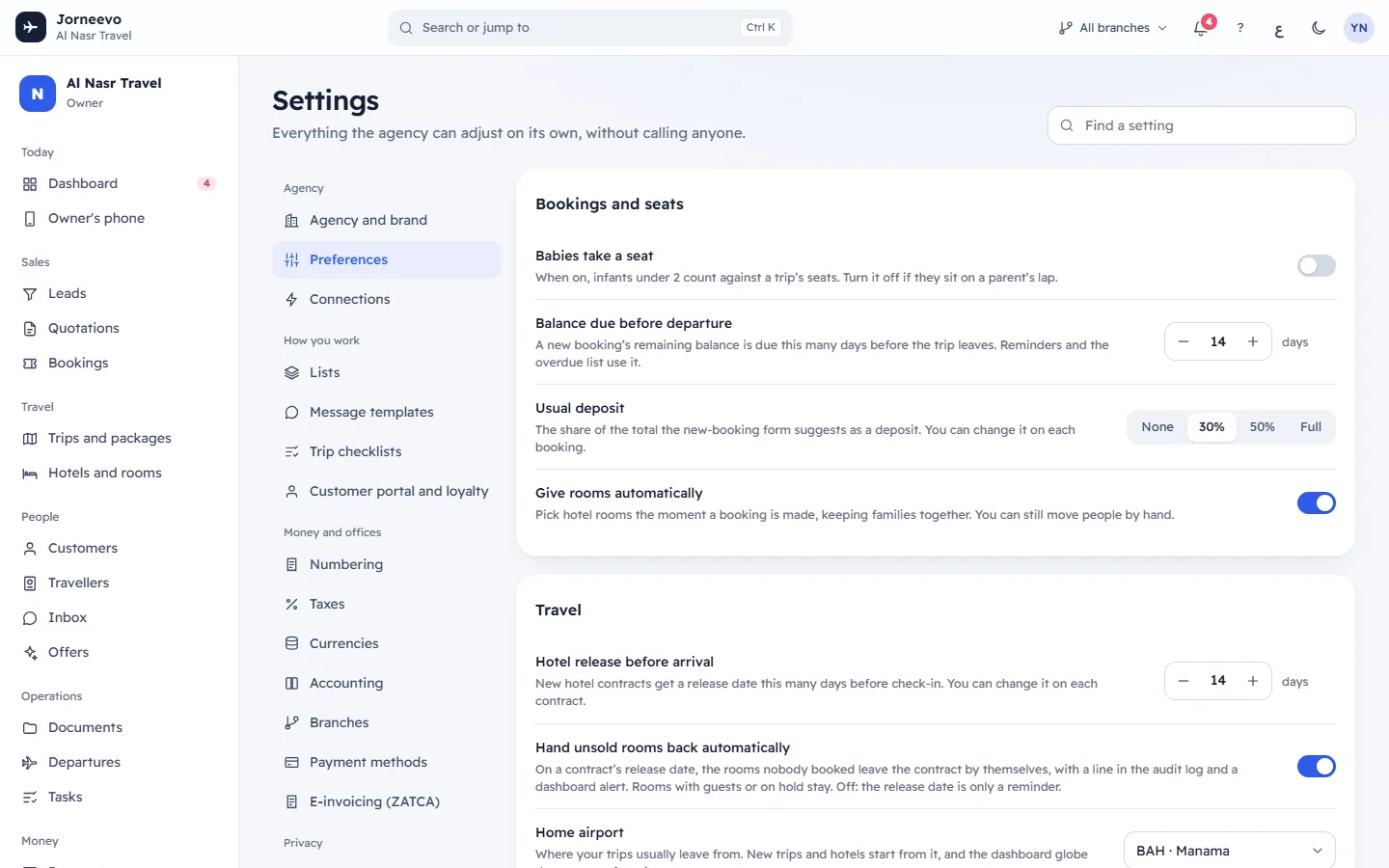
Bookings and seats
| Setting | What it does | Default and range |
|---|---|---|
| Babies take a seat | When on, infants under 2 count against a trip's seats. Turn it off if they sit on a parent's lap. | Off |
| Balance due before departure | A new booking's remaining balance is due this many days before the trip leaves. Reminders and the overdue list use it. | 14 days; 0 to 90 |
| Usual deposit | The share of the total the new-booking form suggests as a deposit. You can change it on each booking. | 30%; or None, 50%, Full |
| Give rooms automatically | Picks hotel rooms the moment a booking is made, keeping families together. You can still move people by hand. | On |
Travel
| Setting | What it does | Default and range |
|---|---|---|
| Hotel release before arrival | New hotel contracts get a release date this many days before check-in. You can change it on each contract. | 14 days; 0 to 60 |
| Hand unsold rooms back automatically | On a contract's release date, the rooms nobody booked leave the contract by themselves, once per contract. Rooms with guests or on hold stay. The contract's history records it and the dashboard shows an alert for 3 days. Off: the release date is only a reminder. See Room contracts (allotments) and release dates. | On |
| Home airport | Where your trips usually leave from. New trips and hotels start from it, and the dashboard globe draws routes from it. | The first airport in your agency's country |
Trips and seats on hold
- Target margin: the trip editor suggests a selling price that leaves this margin over the costs. Type a
percentage from 1 to 90; it is saved when you leave the field or press
Enter. A number outside the range is brought back to 1 or 90. Leave it empty for no suggestion. Empty by default. - Hold lengths offered: the choices people get when they hold seats on a trip. They show as chips, from the
shortest to the longest; the default has a star. By default: 6 h, 1 day, 2 days (the default),
3 days and 7 days.
- Click a chip to make it the default (Make this the default).
- Press × on a chip to remove it. The last chip cannot be removed. If you remove the default, the shortest choice becomes the default.
- To add a choice, type a number of hours from 1 to 720 and press Add or
Enter. Add stays off for a number already in the list. You can have up to 8 choices; the box disappears when you reach 8. - Each change shows Hold lengths saved.
Quotations
- Quotes are valid for: new quotations expire after this many days. You can change the date on any single quote. Default 7 days; 1 to 60.
Customer trip page
| Setting | What it does | Default |
|---|---|---|
| Ask for a code to open it | Customers get a one-time code by WhatsApp, SMS or email before they see passports and payments. Recommended. | On |
| Code length | Shows only while the code is on. Six digits is harder to guess, four is quicker to type. | 4 digits; or 6 digits |
| Customers can upload documents | Customers add passport copies and photos from their trip page. The files go straight to the booking. This is the same setting as Customers can send documents in Settings → Customer portal and loyalty: turning either off stops uploads on both the trip page and the customer account. | On |
Messages
- Send online payment receipts by: when a customer pays online or you approve a transfer they reported, the receipt goes out on this channel, using the Payment receipt template; so does the message when you reject a transfer. Choose WhatsApp (default), SMS or Email. Every channel has a ready-made template in both languages. A customer without a mobile gets it by email, one without an email by WhatsApp. When it cannot be sent, the booking shows it as Failed with the reason and its owner gets a task.
- Passport renewal messages: a number of days from 0 to 180 (default 0, off). That many days before departure, the customer gets the Passport renewal message for each traveller on a confirmed booking whose passport expires less than six months after the trip returns. The system checks once a day and sends it once per traveller and booking: by WhatsApp when the customer has a mobile and WhatsApp is connected to a provider, otherwise by email. Edit the words in Message templates.
- The note under it reminds you: Messages only leave the system when the channel is connected in Connections. Until then they are kept in the message log.
Vouchers and confirmations
Printed for every booking. These texts are saved with a save bar, not at once.
- Emergency phone: printed on vouchers for travellers who need help on the trip. Empty uses the agency phone, which shows greyed in the box.
- Booking terms: in English, printed at the end of every booking confirmation.
- Booking terms in Arabic: used when the document is printed in Arabic.
When you type here, the bar shows Voucher details are not saved yet with Undo changes and Save changes
(or Ctrl S). Saving shows Printed details saved. A field you empty is saved as empty.
Note
These rules apply to what is created from now on. A booking keeps its balance due date, and a quotation keeps its expiry date, from the day it was made. Change the date on that booking or quotation if needed.
What you can do here
- Change any rule above; it is saved as soon as you change it.
- Connect WhatsApp, SMS or email so receipts and codes reach customers: Connections
- Change the words of the payment receipt and the trip page code: Message templates
- See how the usual deposit is offered when you book: Create a booking
If something goes wrong
The screen keeps each value inside its limits, so these messages are rare:
- Use a target margin from 1 to 90 %: the margin is outside 1 to 90.
- Hold lengths must be 1 to 8 whole numbers of hours, each from 1 to 720: a hold length is outside the limits.
- The default hold must be one of the choices: pick the default from the chips.
- Use 0 to 60 days: the hotel release is outside 0 to 60 days.
- Use 0 to 180 days: the passport renewal days are outside 0 to 180.
- Use a deposit from 0 to 100 %: the usual deposit is outside 0 to 100.
Related articles
- The Settings screenWhere the agency adjusts everything on its own: the four groups of sections, the search box that finds any setting, and how changes are saved.
- Message templatesThe words of every message customers and colleagues receive, per channel and language, with booking details filled in and a live preview.
- ConnectionsConnect WhatsApp, email, SMS, online payments and file storage, test each one, and give branches their own payment account.
- Create a bookingBook a customer on a published trip in three steps, take the deposit and send the confirmation, in about a minute.
- Settings questionsShort answers about settings: who can change them, missing sections, saving, finding a setting, effect on existing records, language and data export.