The trip page
One trip or package on one page: the seats, the money and break-even, how ready it is, and tabs for bookings, documents, rooms, costs and tasks.
The trip page is where you run one trip or package from the first sale to the return home. Open it from Trips and packages by clicking a trip.
The header
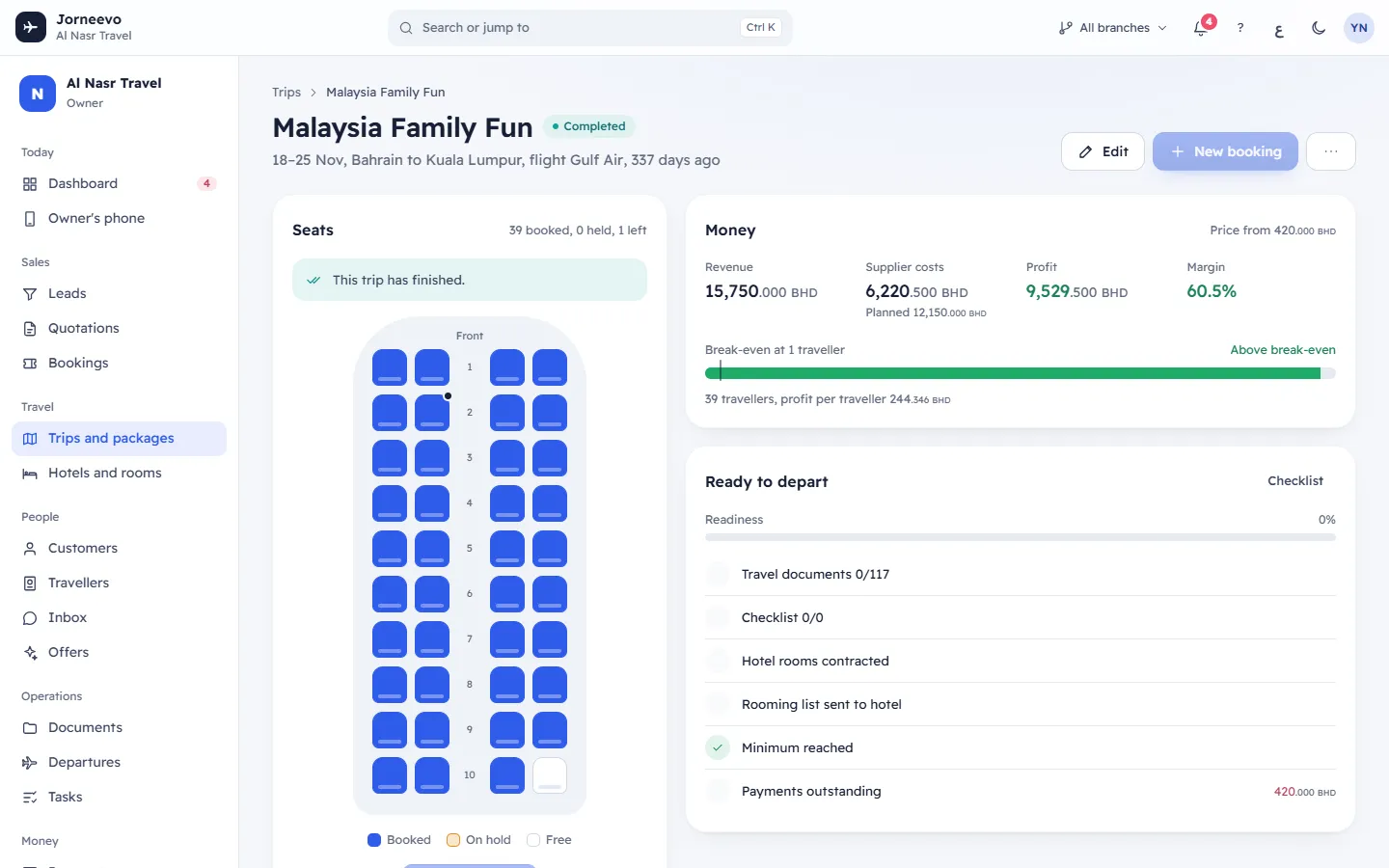
- Trips (back to the list), the trip name and two chips: the status (Draft, Published, Closed for sale, Cancelled, Completed; a published package shows Package) and the live state (Confirmed, Below minimum, Full …).
- One line with the dates, the route ("From Bahrain to Bangkok"), the flight number and time, and when it leaves.
- Buttons:
- Publish (only on a draft): see Publish, close, reopen or unpublish a trip.
- Edit: opens the trip editor. See Create a group trip or a package.
- Hotel rooms (when rooms are contracted): jumps to the Hotels and rooms tab.
- New booking: opens the new-booking form with this trip chosen. It is off with the tip No seats left or Publish the trip to sell it when the trip is full, not published or already back.
- More actions (⋮): Close sales or Reopen sales, Mark completed, Back to draft, Duplicate to a new date, Hold seats, Export manifest (Excel), Cancel trip and Delete trip. You only see the actions that fit the trip's status.
The Seats card
A cabin drawing with one seat per seat for sale: Booked, On hold or Free. A line marks the Minimum, and a FULL gate closes the cabin when every seat is sold. Under it, a note says where the trip stands:
- Full. New sales are closed automatically.
- "2 more travellers needed to confirm this trip." If the minimum counts only paid travellers, it adds "Counted once a deposit is paid" or "Counted once fully paid".
- "Confirmed. 4 seats still free."
- Draft. Publish it to start selling seats., Sales are closed for this trip., This trip is cancelled. or This trip has finished.
When seats are on hold, "Held until …" shows the time they free up. The buttons are Add a booking, Hold seats (or Change hold) and Release holds. See Hold seats on a trip.
When a booking brings the trip to its minimum while the page is open, the message "Trip confirmed. 8 travellers reached the minimum of 8." appears.
The Money card
Only for roles that can see profit. It shows Price from, Revenue, Supplier costs (or Planned costs before any supplier cost is entered), Profit and Margin, and a break-even bar. See Trip profit, break-even and supplier costs.
The Ready to depart card
A readiness percentage and a checklist:
- Travel documents 18/20: click to open the Travellers and documents tab.
- Checklist 5/9: click to open the Checklist tab.
- Hotel rooms contracted and Rooming list sent to hotel.
- Minimum reached.
- Payments outstanding with the amount, or All payments collected (only when you can see money).
The tabs
| Tab | What it holds |
|---|---|
| Bookings | Every booking that is not cancelled: customer, number, travellers, room numbers, total and payment chip. Search appears after 12 bookings; 50 show at a time. A line says how many cancelled bookings are hidden. |
| Travellers and documents | "18 of 20 documents ready" (the count of documents that are in), Open documents, and a table: each traveller, the passport (last 4 digits, or Missing) and one column per document the trip needs: Missing, Received or Sent to the customer. A passport that ends less than 6 months after the return shows its expiry in red. Ready to fly marks a traveller with every document. |
| Hotels and rooms | One line per room contract: hotel, stars, dates, nights, meals, room mix, List sent, rooms booked, Open in 3D and Rooming list. Buttons Contract hotel rooms and Download rooming list, and Who sleeps where room cards. See Contract hotel rooms for a trip. |
| Costs | Only for roles that can see costs: supplier costs, the planned costs line and the total. See Trip profit, break-even and supplier costs. |
| Checklist | The trip's tasks before departure, with Apply templates, Add task and a quick-add line. See Build a trip checklist from templates. |
| Itinerary | The day-by-day programme with the date of each day and what is included or optional. |
| History | Who did what on the trip and when: created, changed, status changes, holds, exports, costs and tasks. System marks automatic changes. |
If the page does not open
This trip could not be found means the trip was deleted, or it belongs to a branch your role cannot see.
Related articles
- Publish, close, reopen or unpublish a tripPut a trip on sale, stop new sales, open them again, take a trip back to draft or mark it completed.
- Hold seats on a tripKeep seats aside for a customer or a group for a few hours or days, so nobody else sells them, and release them early if needed.
- Seats, holds and the minimum group sizeHow seats sold, held and left are counted, when a traveller counts toward the minimum, and what Full and Below minimum mean.
- Trip profit, break-even and supplier costsHow the trip page works out revenue, cost, profit, margin and break-even, and how to add the supplier costs of a trip.
- Contract hotel rooms for a tripReserve a block of hotel rooms for a trip or package (an allotment), with the room types, nights, meals, rates and release date.